
How to Use the MyFerrari App for Service, Vehicle Information, and Ownership Support
Owning a Ferrari comes with a level of care and detail that goes beyond the typical car ownership experience, and Ferrari built a digital tool to match that standard. The MyFerrari App is the official Ferrari application for clients, an all-in-one digital companion for vehicle documentation and service scheduling. Whether you’re setting up the app for the first time or trying to figure out why your dealer search isn’t returning results, our team at Ferrari Lake Forest is available to help. You can reach out to us anytime if you get stuck along the way.
This guide walks through what the app does, how to get it running on your device, and where our factory-trained team in Lake Bluff fits into the picture when the app alone isn’t enough.
What Is the MyFerrari App and Who It’s For
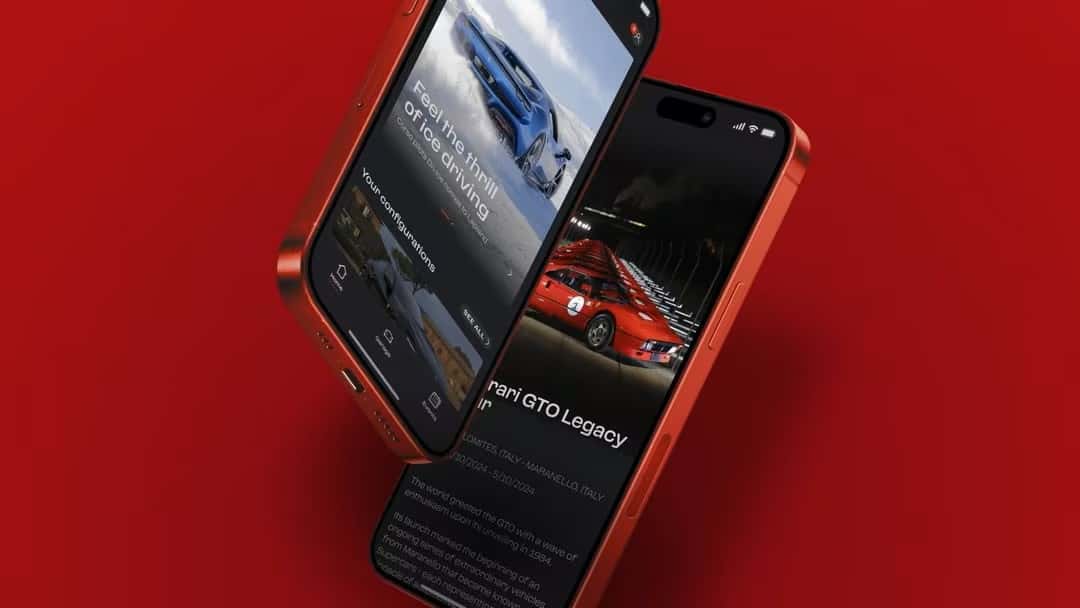
The MyFerrari App is built for two groups: current owners managing their vehicles and enthusiasts who want a closer connection to the brand. It’s structured around four core sections, displayed as HOME, GARAGE, EVENTS, and ON TRACK, along with a PROFILE section for personal account settings. HOME delivers personalized communications, event invitations, model configurations, and Ferrari’s Magazine and News content. GARAGE, often referred to as MyGarage, is where owners manage their vehicles, connected-car details, documents, guides, and certifications. EVENTS ties into the Ferrari Calendar for booking activities, and ON TRACK is relevant to users registered for championship events.
If you’re new to Ferrari ownership, or you’re evaluating a Ferrari app for the first time after browsing our pre-owned inventory, it’s worth setting the app up early. It becomes far more useful once a vehicle is actually linked to your profile.
Key Features at a Glance
The app is a vehicle management and communication tool. Owners can review their maintenance schedule and service history, check warranty details, and receive notifications or reminders tied to upcoming servicing deadlines. Beyond maintenance, it delivers personalized content, invitations to exclusive events and track days, dealer location and connection tools, and access to a car configurator and wishlist feature.
Within MyGarage specifically, owners can view details on Ferraris they’ve purchased or have on consignment, add additional models to their profile, and upload or manage vehicle documents. It’s a genuinely useful tool, and it works best when paired with a dealer who can fill in the gaps a screen never will.
Getting Started: Download, Registration, and Login
Getting the MyFerrari App onto your phone is straightforward, though a few details are worth knowing before you start. On iOS, search “MyFerrari” in the App Store; on Android, search the same term in Google Play. Ferrari makes the app available in eight languages, and it requires iOS 15.0 or later, so if you’re running an older operating system, you may need to update your device first.
Once installed, you’ll go through the standard Ferrari register process: entering your personal information to create an account, then verifying your identity to log in. If your login attempts keep failing, double-check your credentials and try resetting your password before assuming something is broken.
Creating Your Account and Adding a Ferrari to Your Profile
Adding your Ferrari to your profile requires your chassis number, or VIN, along with your license plate information. In many cases, a dealer is involved in this setup. It’s common for a dealer to send a PIN that you then enter into the app to complete the linking process, so don’t be surprised if that step comes up.
If you’ve recently purchased a Ferrari, whether new or through our certified pre-owned program, this is a good moment to loop us in. We can help confirm your VIN details are entered correctly and issue any setup PIN needed on our end. One known friction point is that the in-app dealer search doesn’t always return results, especially for smaller or newer accounts. If that happens, just contact us directly rather than troubleshooting the search function on your own.
Accessing Vehicle Information and Documentation
Once your Ferrari is linked to your profile, the GARAGE section becomes the main place you’ll spend time. This is where you can view information on vehicles you’ve purchased or have on consignment, receive alerts tied to servicing deadlines, upload and manage documents, and even personalize the images associated with your model. You can also register your vehicle formally within the app, access your owner’s manual, and review your service history in one place.
Viewing Build Specs, History, and Warranty Details
Beyond day-to-day maintenance tracking, the app gives owners access to build specifications and photos taken when the car was originally built, alongside any photos you’ve added yourself over time. There’s also a car configurator that supports 3D, production-spec viewing and Ferrari Genuine customization options, though Ferrari restricts this feature to verified owners using either the app or MyGarage on ferrari.com.
Warranty details are also visible here, which matters for owners trying to plan ahead on service. If something in your documentation looks incomplete or doesn’t match your understanding of the vehicle’s history, that’s a good reason to give our service team a call rather than guess. We can cross-reference factory records to confirm accuracy.
Connecting with Your Preferred Ferrari Dealer
One of the more practical functions built into the MyFerrari App is the ability to message your dealer directly and locate other Ferrari dealers around the world. Owners can also share wishlist designs for consultation on a future build. For Chicagoland owners, that dealer connection should point to Ferrari Lake Forest, and setting that up correctly early on saves time later when you need service or have a question about your vehicle.
Messaging Your Service Advisor and Receiving Updates
The messaging function lets you reach your service advisor without picking up the phone, which is convenient for quick questions or updates on ongoing work. Ferrari’s system is designed so that MyFerrari Connect data, when activated, is shared with the dealer, which helps with scheduling service work and planning maintenance ahead of time.
That said, the in-app messaging tool works best as a supplement to a direct relationship with your advisor, not a replacement for one. If you have a time-sensitive question, especially about scheduling in Lake Bluff, calling our service department at (847) 295-6560 will almost always get you a faster answer than waiting on an in-app reply.
Using MyFerrari Connect and Connected-Car Features
MyFerrari Connect moves the app past documentation and communication into active vehicle monitoring, accessed through MyGarage once a vehicle is properly linked and activated. Ferrari states that the system monitors vehicle health, with alerts covering lights, sensors, fluid levels, engine status, and braking, plus the high-voltage battery on plug-in hybrid models. It also tracks Manettino status, odometer readings, and last known position via GPS.
For models equipped with the wi-fi Ferrari Smart Charger, which is standard on select vehicles, the system helps maintain the low-voltage battery and sends alerts through the app when attention is needed. There’s also MyDrive Statistics, which generates a G-force graphic, tracks top speed, and logs Manettino or eManettino usage per trip. Individual trips can be tagged, deleted, or combined for easier record-keeping. Privacy is a legitimate concern with this level of tracking, so the system is read-only by design, and owners can manually toggle Privacy Mode, including deactivating GPS entirely.
Feature Availability by Model and Activation Status
MyFerrari Connect is currently available only in Europe, the US, and Canada, and it first launched on MY2023 models including the 296 GTB, 296 GTS, SF90 Stradale, SF90 Spider, Purosangue, Roma Spider, and SF90 XX. Ferrari continues to update the list of compatible models, so if you’re driving something outside that original lineup, don’t assume you’re excluded; contact us to check current eligibility.
On new vehicles equipped with the necessary hardware, MyFerrari Connect is typically included in the purchase price, and Ferrari Genuine retrofit kits exist for certain compatible models. If you’re curious whether your vehicle qualifies for a retrofit, we’re happy to check and walk you through what that involves. If you ever decide to sell your Ferrari and connected services were activated, you’re responsible for informing Ferrari and canceling ownership through the app before handing over the keys.
Scheduling Authorized Service Through the App
The app is designed to make scheduling maintenance more convenient by connecting your vehicle’s data directly to your preferred dealer, but we’d encourage owners to treat it as a starting point rather than the final word on service planning. For anything beyond routine reminders, scheduling service directly with us ensures your appointment is confirmed by a real person who understands your specific vehicle history.
As a Factory Authorized Dealer since 1981, our service center in Lake Bluff, IL operates by appointment only, staffed by factory-trained and certified technicians who work strictly to manufacturer standards. Every software update, factory bulletin, and parts specification gets applied correctly, something the app itself can’t verify or guarantee.
We also offer a few perks worth knowing about, including a premium car wash and vacuum by appointment, reservable loaner cars, and the 7-Year Genuine Maintenance program, which covers scheduled maintenance labor, original spare parts, engine oil, and brake fluid for qualifying vehicles for up to seven years. For owners outside immediate driving distance, we also offer pickup and return service within 500 miles of Lake Forest, IL, using enclosed trailers and professional drivers; just call our service department to arrange it.
Get Help Connecting Your Ferrari with Ferrari Lake Forest
The MyFerrari App gives owners more visibility into their vehicles and a more direct line to their dealer, and it does that job well. It does have limits, though. Your dealer search might not return results, a password length issue might lock you out, or you might just be unsure whether your model qualifies for MyFerrari Connect. Our team handles all of that.
Reach Our Team Directly
As a Factory Authorized Dealer recognized with a Ferrari Service Award, our award-winning service and parts department in Lake Bluff exists to support owners through both the digital and the hands-on sides of ownership. If you’re having trouble linking your vehicle, verifying connected-car eligibility, or simply want to book authorized service with technicians who know your car’s full history, contact Ferrari Lake Forest or call us directly at (847) 295-6560. We’re glad to be the human backup to the app, whenever you need one.
Images by OEM
0 comment(s) so far on How to Use the MyFerrari App for Service, Vehicle Information, and Ownership Support